 Dandaedre
c8dbf21e83
Gitea/canvas-pilot/pipeline/head This commit looks good
Details
|
||
|---|---|---|
| .cargo | ||
| crates/canvas-pilot | ||
| docs | ||
| scripts | ||
| tests | ||
| tools | ||
| .gitattributes | ||
| .gitignore | ||
| AGENTS.md | ||
| AGENT_DOCUMENTATION.md | ||
| Cargo.lock | ||
| Cargo.toml | ||
| Cross.toml | ||
| Jenkinsfile | ||
| LICENSE | ||
| README.md | ||
| coverage.toml | ||
| rust-release.toml | ||
README.md
Canvas Pilot
Compose your screen layout. Frame every layer. Bring it to the switcher.



Install and update · Read the manual · Releases · Report an issue
Canvas Pilot is a desktop layout editor for presentations and live events. Arrange slides, cameras and other content as layers on a screen, give them precise sizes and positions, and crop each picture into place. Prepare everything offline, exchange layouts with drawing tools, or connect to a supported Analog Way Midra or Aquilon to load and send layer geometry.
Canvas Pilot prepares the layout; your presentation switcher renders the live output. You can use the editor and file exchange without any connected equipment.
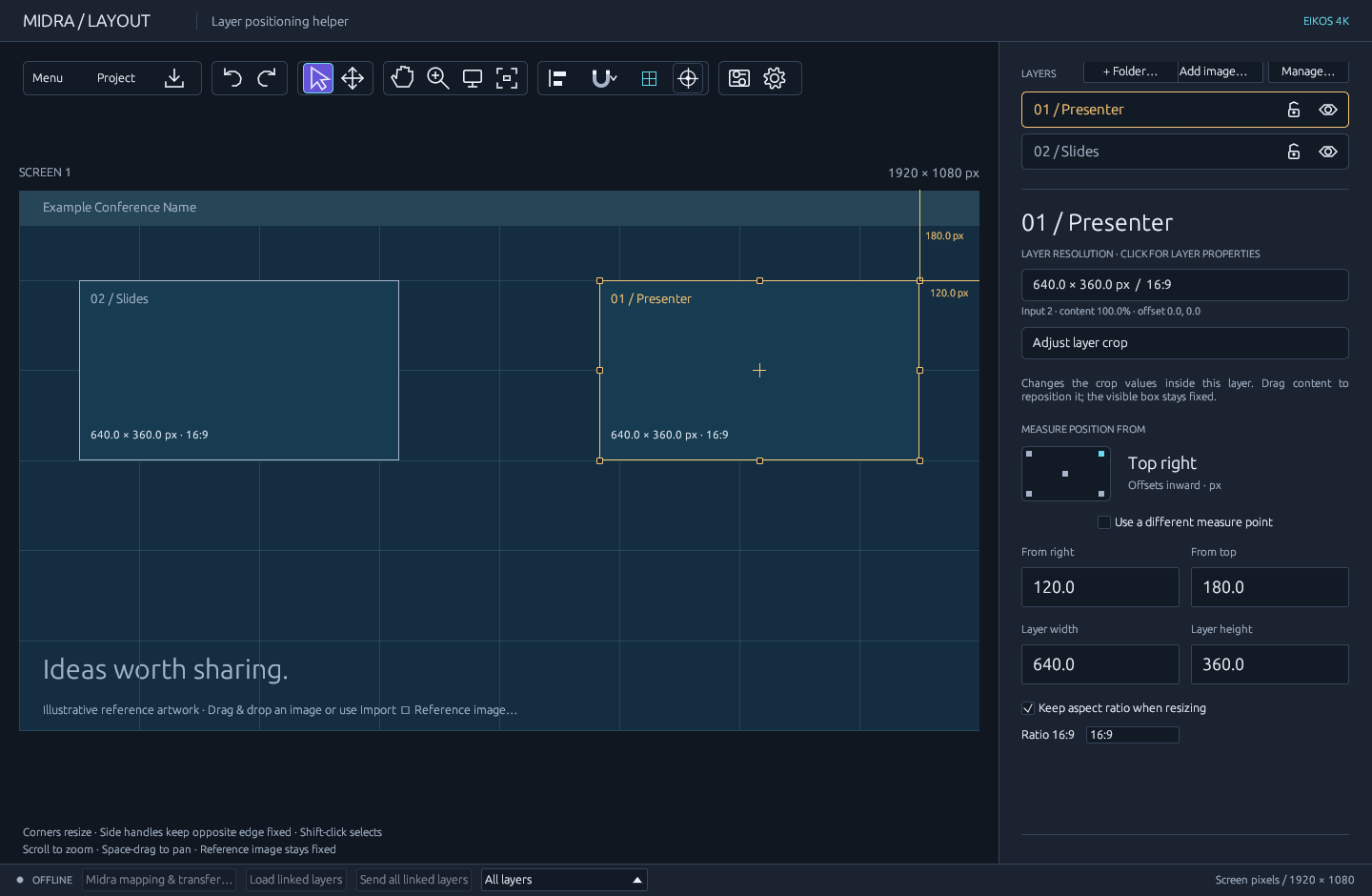
Slides + Presenter on a Full HD canvas. Screenshots predate the Canvas Pilot rename and still show the former “Midra Layout” name.
Open source and development
Canvas Pilot is open-source software under the MIT license. Its development includes LLM-generated or LLM-assisted work, with human review. It is used in professional settings; supported workflows and current limitations are documented in this repository.
From an idea to a screen layout
- Set the stage. Choose a canvas size or import geometry. Add a reference image to position layers against your design.
- Arrange and frame. Drag, resize, snap and align layers. Enter exact pixel measurements, organize layers in folders, and adjust the crop visually.
- Save or exchange. Keep an editable project, export a layout for another tool, or start from the supplied Full HD and 4K templates.
- Transfer when ready. Connect to a supported device, review mappings and explicitly load or send. Ordinary editing stays local.
Walk through your first layout →
Tools for getting the picture right
| Arrange the screen | Frame the content | Work with the device |
|---|---|---|
| Exact sizes and positions | Visual crop, zoom and offset | Load existing layer geometry |
| Snapping, guides and alignment | Reference images and input stills | Review layer-to-device mappings |
| Multi-selection and group resizing | Advanced layer fit and Midra masks | Send selected, folder or all layers |
| Folders, visibility and undo/redo | Saved projects and recovery | Update changed parameters efficiently |
See the crop workspace
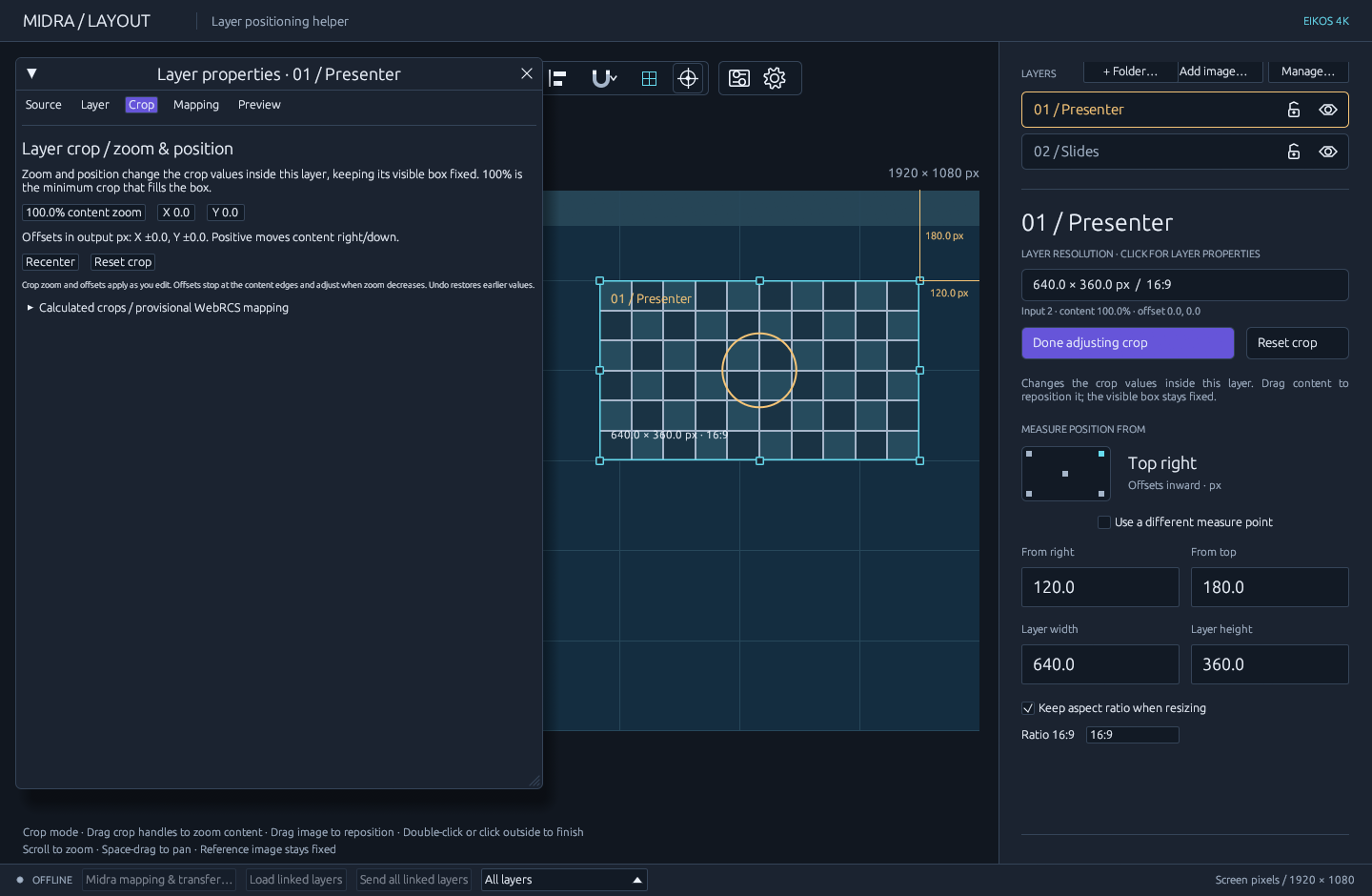
Adjust the picture inside its layer while keeping the layout in view. Explore crop controls and fit modes →
Bring your layout with you
Choose the format your client already edits: SVG for vector editors (including Illustrator), draw.io for diagrams.net, PPTX for PowerPoint, FIG for Figma, or DXF / DWG for CAD. Keep a Canvas Pilot project for continued editing. The comparison guide explains which features each file and clipboard path preserves.
| Choose or download | Markdown | Book |
|---|---|---|
| Choose a format — recommendations and feature matrix | Format guide | Format guide in the book |
| Download templates — pick an editor and Full HD or 4K | Template catalog | Template catalog in the book |
Sending a template to a client? Share the template download page. They can choose their application and canvas size, download a starter file, edit its layer boxes and send it back. The Markdown catalog and book use the same source and template files.
Import and export instructions
For Midra 4K and Aquilon / LivePremier, see the device guide for supported profiles, setup and feature limits. Support depends on model and firmware; Aquilon validation uses the documented standalone emulator profile.
Full manual · Development · Changelog · MIT license
Independent software, not affiliated with Analog Way.